Notices

Overclockers Forums > Hardware > Cooling > Water Cooling
Water Cooling Discussion devoted to blocks, pumps, radiators, reservoirs, tubing, and everything else to get you running smooth on a water loop
Forum Jump

My first Custom Loop!

Post Reply New Thread Subscribe Search this Thread
 
 
Thread Tools
Old 08-05-11, 01:09 PM Thread Starter   #1
kskwerl
Member

 
kskwerl's Avatar 

Join Date: Jul 2010
Location: New Jersey

 
My first Custom Loop!


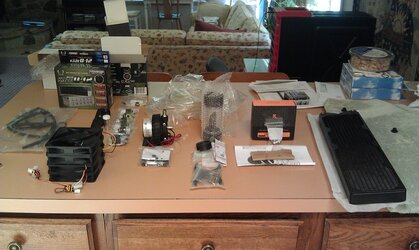
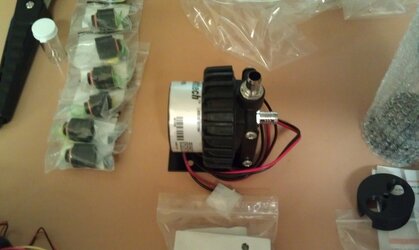
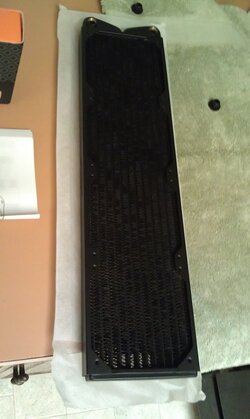
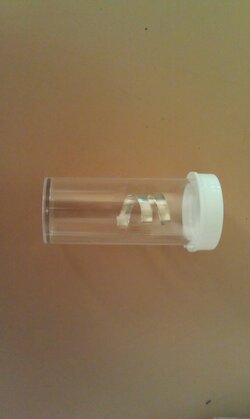
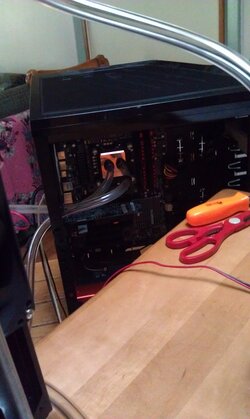
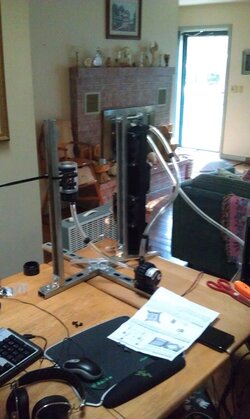
Some this is my first custom loop. I had a thermaltake 2U all in one kit back when I had a Phenom 9850. Well here's my gear. This is just a single loop for my i7 2600k. I had a Meghalens Rev B and wasn't happy with the temps I was getting at the OC I wanted. That is what started this..

Radiator: Swiftech MCR420-QP Quiet Power 4X120mm - Matte Black ( 8 Yate Loon 120x25mm D12SH-12 High Speed - Black (88 CFM, 40 dBA) in a push/pull)
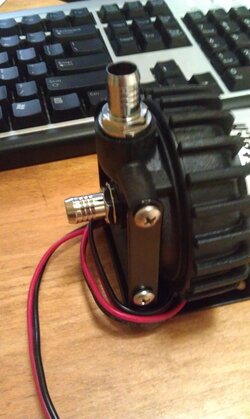
Pump: Sidewinder Custom MCP655 / Laing D5 with G 1/4 Threads
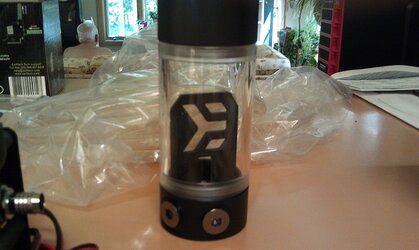
Res: EK-Multioption RES X2 - 150 Advanced
Block: EK Supreme HF Full Copper - Easy Mount
Tubing: Tygon B-44-4X Food, Milk and Dairy 3/8in. ID 5/8in. OD Laboratory Tubing #
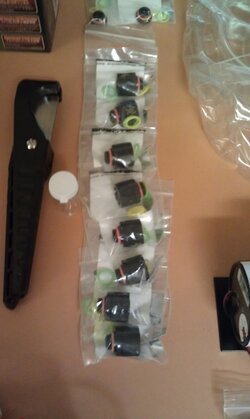
Fittings: Enzotech Matte Black Compression Fitting for 3/8in. x 5/8in. Tubing x8

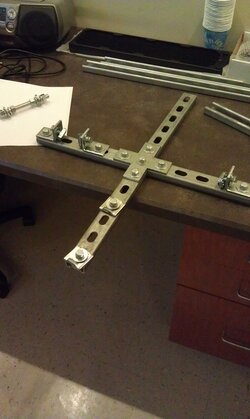
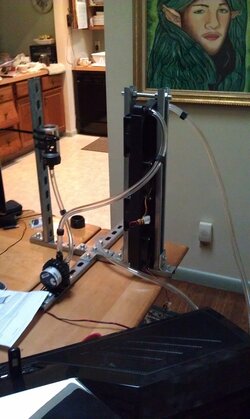
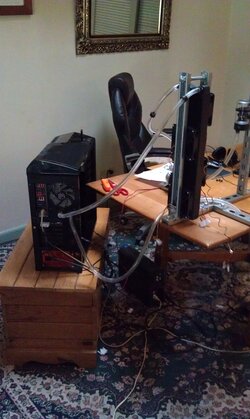
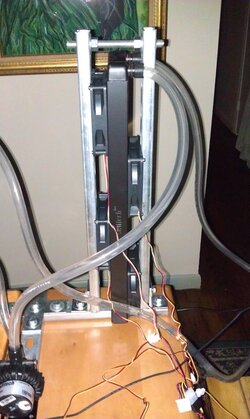
Now I have a NZXT Phantom, I saw one guy on the forum who had figured a new way to mount a 360 rad ontop/inside the case. I wasn't really comfortable with doing this and having all that water inside my comp so I build a stand for my rad/pump/res out of unistrut. I have this stuff lying around at work and a coworker helped me cut it and put it all together. Props to him as all this equipment would prob just be sitting on my desk right now. Even though it looks pretty beefy I am really happy with it.
Attached Images
             

__________________
Case: Corsair 800D
Motherboard: ASUS Maximus IV Extreme Z
CPU: 2500k @ Stock (Custom WC Loop)
Memory: Mushkin Enhanced Radioactive 8GB @ 1600
HD: Crucial M4 64GB (OS) | 300GB WD Raptor
Video Card: XFX HD 4870 (for now)
PSU: Corsair HX850

Last edited by kskwerl; 08-06-11 at 01:09 PM.
kskwerl is offline   QUOTE Thanks
Old 08-05-11, 01:09 PM Thread Starter   #2
kskwerl
Member

 
kskwerl's Avatar 

Join Date: Jul 2010
Location: New Jersey

 
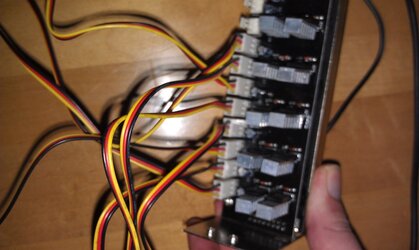
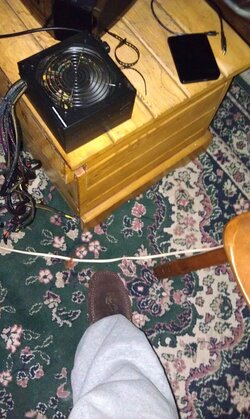
I also bought a Scythe Kaze Black Q12 12-Channel Fan Controller for the fans. This this was around 25 USD, idk what I expected but it def does not seem to control the rpm's at all. I'll replace that later though. I also hooked up a stand alone 400 watt PSU for just the pump/fans/fan controller.

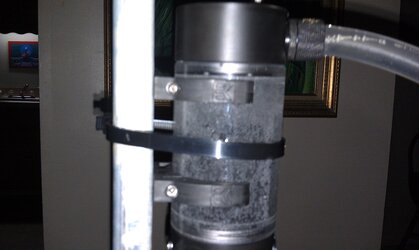
On a side note, I seem to have a massive amount of bubbles in my res. All very small bubbles maybe the size of a pin head but there is a lot of them. As I'm new to this could anyone tell me if this is normal or how I can get rid of them, even what I may have done to cause this.

Loop order is Res>Pump>Rad>CPU>Res

__________________
Case: Corsair 800D
Motherboard: ASUS Maximus IV Extreme Z
CPU: 2500k @ Stock (Custom WC Loop)
Memory: Mushkin Enhanced Radioactive 8GB @ 1600
HD: Crucial M4 64GB (OS) | 300GB WD Raptor
Video Card: XFX HD 4870 (for now)
PSU: Corsair HX850

Last edited by kskwerl; 08-06-11 at 01:15 PM.
kskwerl is offline   QUOTE Thanks
Old 08-06-11, 08:06 PM   #3
jmdixon85
Member

 
jmdixon85's Avatar 

Join Date: Oct 2008
Location: Cumbria (UK)

 
Congrats on your first loop

Shame that fan controller didn't work for you. 8 high speed yate loons can't be easy on the ears. You could maybe post some pics of how you had the fan controller connected up, just incase we can spot something wrong

Don't worry to much about the tiny bubles. I usually let my loop run for a good few hours with no cap on the res, althought I'm not sure if leaving it off gets rid of the bubbles faster I usually go around tapping/flicking the tubing a rad for a few minutes just to loosen up any bubbles that decide to be a Klingon . Usually gets them shifted quite abit faster

__________________
Main System/File Server/Secondary System/SmoothWall
CPU: I2500K @ 4.8Ghz (H2o cooled)//Q9650/Q6600 @ 3.5Ghz/AMD Athlon 215
Mainboard: AsRock Z77 Extreme 4/Asus P5Q Deluxe/Gigabyte P35-DS3P/Gigabyte GA-78LMT-USB3
RAM: 8GB DDR3 1600Mhz/6GB DDR2 800Mhz/4GB DDR2 1066Mhz/2GB DDR2
Video: nVidia GTX 460/nVidia 210/NVidia GTX295/Radeon 3000
HDD: 128GB SSD (System)/WD VR 300GB(Games)/ 80GB HDD (TV Recordings)/Samsung 160GB (Sytem), 4x 1TB (RAID5 Data)/3TB (Backup) HighpointRR 3520 RAID Card/VR 160GB (system) 1TB (Data)/160GB
PSU: FSP 800W/Enermax 495W/Ximatek 500W/FSP 300W
Case: Coolermaster HAF932/CM Cosmos S/Cosmos 1000
Audio: Toslink -> Pioneer VSX-820-K (Dolby TrueHD/DTS Master Audio)/Logitech X-530
i7/i5/i3 Overclocking Guide/Intel Core2 overclocking guide/AMD AM2 overclocking Guide
jmdixon85 is offline   QUOTE Thanks
Old 08-06-11, 08:12 PM   #4
Conumdrum
Mutant Forrespondent

 
Conumdrum's Avatar 

Join Date: Sep 2007
Location: Las Vegas

 
Give it a day, perfectly normal. They will poof in time.

Keep the res almost 100% full. It will drop 1/2" or so the first day.

What the diff between the Starship Enterprise and Toilet Paper?

Thye both circle Uranus and wipe out Klingons.

__________________
All stock for now, no need for more, but it's gonna be soon methinks.
Giga Xtreme 58 mobo i7 965 ES D0 step Corsair 1600 6 gig
SLI GTX470 OC when I need it to 870 GPU/1725 mem
EK HF nickle blue top CPU block (free from Eddie)
Koolance 470 waterblocks
One big loop, two 120x3 rads. Pa 120.3 and XSPC RX 120x3. Swiftech 35x pump with V2 restop. GT AP15 fans.
Banchetto Tech Station
120 GB SSD, and a few other drives.
1000W UltraX3 PSU, 900 watt (1500VA UPS
27" ASUS VG 3D/Nvidia V2 3D glasses and 24" Acer H243H UPS is 1500 PFCLCD
Conumdrum is offline Author Profile   QUOTE Thanks
Old 08-06-11, 09:23 PM Thread Starter   #5
kskwerl
Member

 
kskwerl's Avatar 

Join Date: Jul 2010
Location: New Jersey

 
Quote:
Originally Posted by jmdixon85 View Post
Congrats on your first loop

Shame that fan controller didn't work for you. 8 high speed yate loons can't be easy on the ears. You could maybe post some pics of how you had the fan controller connected up, just incase we can spot something wrong

Don't worry to much about the tiny bubles. I usually let my loop run for a good few hours with no cap on the res, althought I'm not sure if leaving it off gets rid of the bubbles faster I usually go around tapping/flicking the tubing a rad for a few minutes just to loosen up any bubbles that decide to be a Klingon . Usually gets them shifted quite abit faster
Thanks man! I'm really happy with how everything went, now I'm sitting at 4.6 Ghz with vcore @ 1.340v LLC Level 7. Under load it raises to 1.44v with 100% load. I'm still testing lower voltages tho. Temps never go above 70C under load. The yate loons are suprisingly quiet to me compared to the 3000rpm Ultra Kaze's I had. I'm used to loud fans so these are actually quiet nice to me. I'll post some pics tomorrow of the fan controller. The problem with the res is the way I have it set up and how full it is, I don't think I will be able to run it with a port hole off. Pictures will explain.

Quote:
Originally Posted by Conumdrum View Post
Give it a day, perfectly normal. They will poof in time.

Keep the res almost 100% full. It will drop 1/2" or so the first day.

What the diff between the Starship Enterprise and Toilet Paper?

Thye both circle Uranus and wipe out Klingons.
I mean it's been 24 hours since the loop was installed but I def saw a drop in the res, maybe not half and a lot of the bubbles are gone but there's still a bunch. Let me take some pics.

__________________
Case: Corsair 800D
Motherboard: ASUS Maximus IV Extreme Z
CPU: 2500k @ Stock (Custom WC Loop)
Memory: Mushkin Enhanced Radioactive 8GB @ 1600
HD: Crucial M4 64GB (OS) | 300GB WD Raptor
Video Card: XFX HD 4870 (for now)
PSU: Corsair HX850
kskwerl is offline   QUOTE Thanks
Old 08-06-11, 09:31 PM Thread Starter   #6
kskwerl
Member

 
kskwerl's Avatar 

Join Date: Jul 2010
Location: New Jersey

 
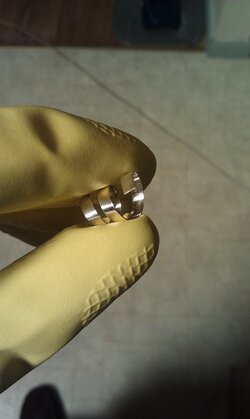
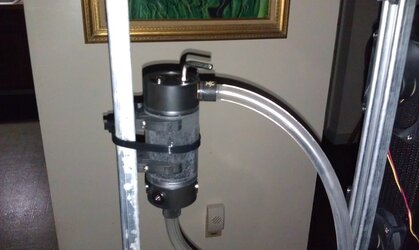
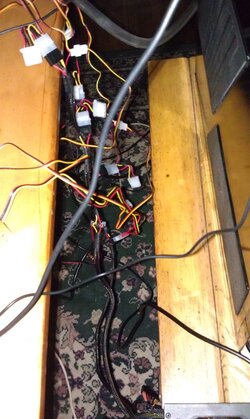
Here's some pictures, it's daisy chain mania or here with these fans.

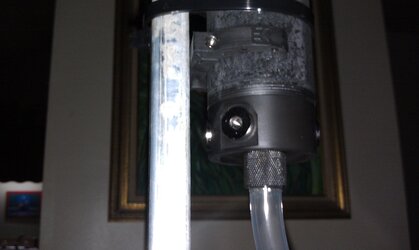
Also check out the res, think I could switch the top tube to another port on the bottom side? so I could run it with a port open on the top.


Also that's the 400 watt corsair PSU that I'm using strictly for the fans/fan controller/pump.
Attached Images
       

__________________
Case: Corsair 800D
Motherboard: ASUS Maximus IV Extreme Z
CPU: 2500k @ Stock (Custom WC Loop)
Memory: Mushkin Enhanced Radioactive 8GB @ 1600
HD: Crucial M4 64GB (OS) | 300GB WD Raptor
Video Card: XFX HD 4870 (for now)
PSU: Corsair HX850
kskwerl is offline   QUOTE Thanks
Old 08-06-11, 09:33 PM Thread Starter   #7
kskwerl
Member

 
kskwerl's Avatar 

Join Date: Jul 2010
Location: New Jersey

 
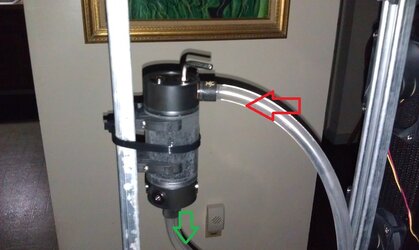
Red is going in from the CPU block and green is from res to pump.
Attached Images
 

__________________
Case: Corsair 800D
Motherboard: ASUS Maximus IV Extreme Z
CPU: 2500k @ Stock (Custom WC Loop)
Memory: Mushkin Enhanced Radioactive 8GB @ 1600
HD: Crucial M4 64GB (OS) | 300GB WD Raptor
Video Card: XFX HD 4870 (for now)
PSU: Corsair HX850
kskwerl is offline   QUOTE Thanks
Old 08-06-11, 11:42 PM   #8
Conumdrum
Mutant Forrespondent

 
Conumdrum's Avatar 

Join Date: Sep 2007
Location: Las Vegas

 
Wrong inlet. Unless you have a down tube in the res it will always do that.

Come in from the bottom/side.

__________________
All stock for now, no need for more, but it's gonna be soon methinks.
Giga Xtreme 58 mobo i7 965 ES D0 step Corsair 1600 6 gig
SLI GTX470 OC when I need it to 870 GPU/1725 mem
EK HF nickle blue top CPU block (free from Eddie)
Koolance 470 waterblocks
One big loop, two 120x3 rads. Pa 120.3 and XSPC RX 120x3. Swiftech 35x pump with V2 restop. GT AP15 fans.
Banchetto Tech Station
120 GB SSD, and a few other drives.
1000W UltraX3 PSU, 900 watt (1500VA UPS
27" ASUS VG 3D/Nvidia V2 3D glasses and 24" Acer H243H UPS is 1500 PFCLCD
Conumdrum is offline Author Profile   QUOTE Thanks
Old 08-06-11, 11:54 PM Thread Starter   #9
kskwerl
Member

 
kskwerl's Avatar 

Join Date: Jul 2010
Location: New Jersey

 
Quote:
Originally Posted by Conumdrum View Post
Wrong inlet. Unless you have a down tube in the res it will always do that.

Come in from the bottom/side.
ok cool thanks, I'll fix it and let you guys know.

__________________
Case: Corsair 800D
Motherboard: ASUS Maximus IV Extreme Z
CPU: 2500k @ Stock (Custom WC Loop)
Memory: Mushkin Enhanced Radioactive 8GB @ 1600
HD: Crucial M4 64GB (OS) | 300GB WD Raptor
Video Card: XFX HD 4870 (for now)
PSU: Corsair HX850
kskwerl is offline   QUOTE Thanks
Old 08-07-11, 12:42 AM Thread Starter   #10
kskwerl
Member

 
kskwerl's Avatar 

Join Date: Jul 2010
Location: New Jersey

 
kk, fix it. It has no bubbles in the tubes now just the res. Also its a lot less noisy.

__________________
Case: Corsair 800D
Motherboard: ASUS Maximus IV Extreme Z
CPU: 2500k @ Stock (Custom WC Loop)
Memory: Mushkin Enhanced Radioactive 8GB @ 1600
HD: Crucial M4 64GB (OS) | 300GB WD Raptor
Video Card: XFX HD 4870 (for now)
PSU: Corsair HX850
kskwerl is offline   QUOTE Thanks
Old 08-07-11, 10:51 AM   #11
karkas
Member

 
karkas's Avatar 

Join Date: May 2008
Location: Phoenix, AZ

 
Crazy setup. I'd be afraid I'd walk by in a drunken stupor and fall into it or something.

Grats tho, I can't wait to get my loop assembled.

__________________
i series CPU spec comparison

Heat
karkas is offline   QUOTE Thanks
Old 08-07-11, 11:01 AM Thread Starter   #12
kskwerl
Member

 
kskwerl's Avatar 

Join Date: Jul 2010
Location: New Jersey

 
Quote:
Originally Posted by karkas View Post
Crazy setup. I'd be afraid I'd walk by in a drunken stupor and fall into it or something.

Grats tho, I can't wait to get my loop assembled.
lol I do fear this but this whole stand made of unistrut is pretty hefty. My cat was investigating it yesterday and I was worried about that but he's bored with it now.


Also on a side note, i got the fan controller to work. I had the 3 pin hooked into the controller and the 4 pin molex connected to the power supply, looks like I only need the 3 pin to the controller. Now I can adjust speeds accordingly.

__________________
Case: Corsair 800D
Motherboard: ASUS Maximus IV Extreme Z
CPU: 2500k @ Stock (Custom WC Loop)
Memory: Mushkin Enhanced Radioactive 8GB @ 1600
HD: Crucial M4 64GB (OS) | 300GB WD Raptor
Video Card: XFX HD 4870 (for now)
PSU: Corsair HX850
kskwerl is offline   QUOTE Thanks
Old 08-08-11, 01:58 PM Thread Starter   #13
kskwerl
Member

 
kskwerl's Avatar 

Join Date: Jul 2010
Location: New Jersey

 
Quote:
Originally Posted by Conumdrum View Post
Wrong inlet. Unless you have a down tube in the res it will always do that.

Come in from the bottom/side.
Not a single bubble in the tubes or res, ty Conumdrum!

__________________
Case: Corsair 800D
Motherboard: ASUS Maximus IV Extreme Z
CPU: 2500k @ Stock (Custom WC Loop)
Memory: Mushkin Enhanced Radioactive 8GB @ 1600
HD: Crucial M4 64GB (OS) | 300GB WD Raptor
Video Card: XFX HD 4870 (for now)
PSU: Corsair HX850
kskwerl is offline   QUOTE Thanks
Old 08-08-11, 02:02 PM Thread Starter   #14
kskwerl
Member

 
kskwerl's Avatar 

Join Date: Jul 2010
Location: New Jersey

 
Ok so check this out, I am at 4.6ghz. vcore is 1.345 in BIOS LLC level 7. I can pass 500 intel burn test on standard with threads set to 8. But when I set memory to high, I can't even pass 5 tests. What gives? I have 4 gbs of ram. I can run 14 hours of all 3 different Prime95 tests.

__________________
Case: Corsair 800D
Motherboard: ASUS Maximus IV Extreme Z
CPU: 2500k @ Stock (Custom WC Loop)
Memory: Mushkin Enhanced Radioactive 8GB @ 1600
HD: Crucial M4 64GB (OS) | 300GB WD Raptor
Video Card: XFX HD 4870 (for now)
PSU: Corsair HX850
kskwerl is offline   QUOTE Thanks
Old 08-08-11, 03:59 PM   #15
Conumdrum
Mutant Forrespondent

 
Conumdrum's Avatar 

Join Date: Sep 2007
Location: Las Vegas

 
Quote:
Originally Posted by kskwerl View Post
Ok so check this out, I am at 4.6ghz. vcore is 1.345 in BIOS LLC level 7. I can pass 500 intel burn test on standard with threads set to 8. But when I set memory to high, I can't even pass 5 tests. What gives? I have 4 gbs of ram. I can run 14 hours of all 3 different Prime95 tests.
Dunno, now you can ask in the Intel CPU section since your temps and watercooling is working great.

__________________
All stock for now, no need for more, but it's gonna be soon methinks.
Giga Xtreme 58 mobo i7 965 ES D0 step Corsair 1600 6 gig
SLI GTX470 OC when I need it to 870 GPU/1725 mem
EK HF nickle blue top CPU block (free from Eddie)
Koolance 470 waterblocks
One big loop, two 120x3 rads. Pa 120.3 and XSPC RX 120x3. Swiftech 35x pump with V2 restop. GT AP15 fans.
Banchetto Tech Station
120 GB SSD, and a few other drives.
1000W UltraX3 PSU, 900 watt (1500VA UPS
27" ASUS VG 3D/Nvidia V2 3D glasses and 24" Acer H243H UPS is 1500 PFCLCD
Conumdrum is offline Author Profile   QUOTE Thanks
Old 08-08-11, 04:43 PM   #16
wingman99
Member

 
wingman99's Avatar 

Join Date: Dec 2003

 
Test your memory at stock settings with mem86.

__________________
i5 2500K @5.0 GHz
Motherboard Gigabyte Z68A-D3-B3

G.SKILL RipjawsX X.M.P. 1600MHz
EVGA SuperClocked GTX 570

SOLD Ivy bridge i5 3570k
wingman99 is offline   QUOTE Thanks

Post Reply New Thread Subscribe


Overclockers Forums > Hardware > Cooling > Water Cooling
Water Cooling Discussion devoted to blocks, pumps, radiators, reservoirs, tubing, and everything else to get you running smooth on a water loop
Forum Jump

Thread Tools Search this Thread
Search this Thread:

Advanced Search


Mobile Skin
All times are GMT -5. The time now is 02:29 PM.
Powered by vBulletin® Version 3.8.7
Copyright ©2000 - 2013, vBulletin Solutions, Inc.
You can add these icons by updating your profile information to include your Heatware ID, Benching Profile ID or your Folding/SETI profile ID. Edit your profile!
X

Welcome to Overclockers.com

Create your username to jump into the discussion!

New members like you have made this the best community on the Internet since 1998!


(4 digit year)

Why Join Us?

  • Share experience
  • Max out your hardware
  • Best forum members anywhere
  • Customized forum experience

Already a member?