View Full Version : My computer Pics
http://home.comcast.net/~nickbaldwin/wsb/html/view.cgi-home.html-.html Thanks for lookin and thanks for the comments give as many as you like and I would love to hear of anything that would help make it better. Thanks again. :attn:
ps comment on my web page to and if you have any suggestions tell me.
Icebl@ster
07-31-04, 07:05 PM
well after saving the images then looking at them(way to big on the website)Looks nice
SewerBeing
07-31-04, 07:38 PM
I agree, it looks nice and the performance is good. Great job. I like the red theme you have going on. Very neat also. And please make those pics smaller.
[DAD]MeR|iN
07-31-04, 07:45 PM
Nice work, The red does look sweet! What type of rad are you using?
Nice website and rig. What waterblock are you using, and what are load (prime 95) temps? That red looks good.
SomaGaze
07-31-04, 08:18 PM
this is no hit against you Ripley, but:
how can you make a drive bay reservoir (be it 3.5 or 5.25) not look so tacky? (sp?)
I love the idea of being able to see your coolant at work, but when i get my dual 3.5 bay set up, i would rather it blend it with the case so it doesn't stick out like a sore thumb...
I am using a DD TDX water Block and XtremeII (Dual 120mm)
RAD and what is tacky about the REs waht should i do to make it better.
SomaGaze
08-01-04, 03:45 PM
since i am waiting for my wc stuff to get here, i don't have my res to look at...but here's what i might try:
i might try to set the res back a little to allow the case drive cover (or bezel, or whatever it is) to still fit in. then i'll take my dremel to it to make a quick small design on those bezels to blend the res in better. I just really don't want to see how the res is glued together...maybe i'll photoshop something and post it a little later...
SomaGaze
08-01-04, 04:13 PM
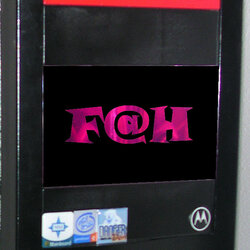
pardon my photoshop abilities...
i just threw something in there...not sure what i would dremel out of the bezels though...
Sophisticated
08-01-04, 04:48 PM
veri nice computer...red is my fav color!!!
thanks guys for the comments and what is F@H and ya i love red too
[KX3]rAge
08-01-04, 05:22 PM
thanks guys for the comments and what is F@H and ya i love red too
F@H stands for Folding@Home :p
SomaGaze
08-02-04, 12:35 AM
its a background distributed comp program that folds proteins. just like SETI@home, except we are curing cancer :thup:
Radical
08-02-04, 12:41 AM
what does that mean??
- http://www.ocforums.com/forumdisplay.php?f=21
- http://folding.stanford.edu/
- http://folding.octeams.com/
Ok coo but i dont think i will put that on my REs
SomaGaze
08-02-04, 01:12 AM
Ok coo but i dont think i will put that on my REs
heh heh, it was just something that came to me real quick. as an idea of what you can do with your RES
Looks nice, good site too. Im not a big fan of the front though i must say.
I suggest doing what SomaGaze was talkin about, that would improve it a whole lot, maybe put black bezels on the drives too, other than that it looks nice, gj
so paint the red drives black OR and thanks for the comment SOMAGAZE i am thinking of something to put on there really am just dont know yet
SomaGaze
08-02-04, 01:47 AM
so paint the red drives black OR and thanks for the comment SOMAGAZE i am thinking of something to put on there really am just dont know yet
be sure to give an update once you decide what to do
ok sure and do you have any hints any suggestions
SomaGaze
08-02-04, 01:41 PM
measure twice and cut once :p do something that goes with your biohazard theme
SomaGaze
08-02-04, 04:01 PM
i'm not sure if you are trying to attach an image to the post, or link to one. but from the code i see, you are posting a pic from your computer. Upload the images to a host or attach the images to the post
ok if you want to see what i did with it you can go look at my web site
http://home.comcast.net/~nickbaldwin/wsb/html/view.cgi-home.html-.html
very nice site, but you MaY wAnT tO cHaNgE tHiS lAmE uP aNd DoWn TeXt CrAp
vBulletin® v3.8.7, Copyright ©2000-2013, vBulletin Solutions, Inc.