
Notices

Overclockers Forums > Software > Programming Tips and Tricks
Programming Tips and Tricks
Forum Jump

CSS Problem..

Post Reply New Thread Subscribe Search this Thread
 
 
Thread Tools
Old 11-28-07, 02:59 PM Thread Starter   #1
asusradeon
Member

 
asusradeon's Avatar 

Join Date: Oct 2004
Location: 127.0.0.1

 
CSS Problem..


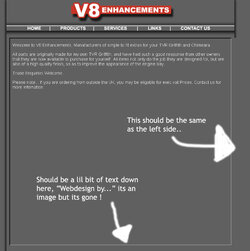
Hi guys, got a dilema, i've generated a page in Photoshop using CSS, (Trying to steer clear of tables) problem is i cant centre it all and i also want to add an iframe in the postion of image19. i've tryed everything i can think of to centre it and no luck..

Code:
<!DOCTYPE html PUBLIC "-//W3C//DTD XHTML 1.0 Transitional//EN" "http://www.w3.org/TR/xhtml1/DTD/xhtml1-transitional.dtd">
<html xmlns="http://www.w3.org/1999/xhtml">
<head>
<title>proto_1</title>
<meta http-equiv="Content-Type" content="text/html; charset=iso-8859-1" />
<!-- ImageReady Styles (proto_1.psd) -->
<style type="text/css">
<!--

#Table_01 {
    position:absolute;
    left:0px;
    top:0px;
    width:790px;
    height:870px;
}

#index-01_ {
    position:absolute;
    left:0px;
    top:0px;
    width:790px;
    height:86px;
}

#index-02_ {
    position:absolute;
    left:0px;
    top:86px;
    width:88px;
    height:39px;
}

#index-03_ {
    position:absolute;
    left:88px;
    top:86px;
    width:46px;
    height:13px;
}

#index-04_ {
    position:absolute;
    left:134px;
    top:86px;
    width:66px;
    height:39px;
}

#index-05_ {
    position:absolute;
    left:200px;
    top:86px;
    width:81px;
    height:13px;
}

#index-06_ {
    position:absolute;
    left:281px;
    top:86px;
    width:59px;
    height:39px;
}

#index-07_ {
    position:absolute;
    left:340px;
    top:86px;
    width:79px;
    height:13px;
}

#index-08_ {
    position:absolute;
    left:419px;
    top:86px;
    width:66px;
    height:39px;
}

#index-09_ {
    position:absolute;
    left:485px;
    top:86px;
    width:46px;
    height:13px;
}

#index-10_ {
    position:absolute;
    left:531px;
    top:86px;
    width:62px;
    height:39px;
}

#index-11_ {
    position:absolute;
    left:593px;
    top:86px;
    width:98px;
    height:13px;
}

#index-12_ {
    position:absolute;
    left:691px;
    top:86px;
    width:99px;
    height:39px;
}

#index-13_ {
    position:absolute;
    left:88px;
    top:99px;
    width:46px;
    height:26px;
}

#index-14_ {
    position:absolute;
    left:200px;
    top:99px;
    width:81px;
    height:26px;
}

#index-15_ {
    position:absolute;
    left:340px;
    top:99px;
    width:79px;
    height:26px;
}

#index-16_ {
    position:absolute;
    left:485px;
    top:99px;
    width:46px;
    height:26px;
}

#index-17_ {
    position:absolute;
    left:593px;
    top:99px;
    width:98px;
    height:26px;
}

#index-18_ {
    position:absolute;
    left:0px;
    top:125px;
    width:31px;
    height:745px;
}

#index-19_ {
    position:absolute;
    left:31px;
    top:125px;
    width:726px;
    height:677px;
}

#index-20_ {
    position:absolute;
    left:757px;
    top:125px;
    width:33px;
    height:745px;
}

#index-21_ {
    position:absolute;
    left:31px;
    top:802px;
    width:726px;
    height:17px;
}

#index-22_ {
    position:absolute;
    left:31px;
    top:819px;
    width:292px;
    height:51px;
}

#index-23_ {
    position:absolute;
    left:323px;
    top:819px;
    width:150px;
    height:19px;
}

#index-24_ {
    position:absolute;
    left:473px;
    top:819px;
    width:284px;
    height:51px;
}

#index-25_ {
    position:absolute;
    left:323px;
    top:838px;
    width:150px;
    height:32px;
}

-->
</style>
<!-- End ImageReady Styles -->
</head>
<body style="background-color:#606060;">
<!-- ImageReady Slices (proto_1.psd) -->
<div id="Table_01">
    <div id="index-01_">
        <img id="index_01" src="images/index_01.jpg" width="790" height="86" alt="" />
    </div>
    <div id="index-02_">
        <img id="index_02" src="images/index_02.jpg" width="88" height="39" alt="" />
    </div>
    <div id="index-03_">
        <img id="index_03" src="images/index_03.jpg" width="46" height="13" alt="" />
    </div>
    <div id="index-04_">
        <img id="index_04" src="images/index_04.jpg" width="66" height="39" alt="" />
    </div>
    <div id="index-05_">
        <img id="index_05" src="images/index_05.jpg" width="81" height="13" alt="" />
    </div>
    <div id="index-06_">
        <img id="index_06" src="images/index_06.jpg" width="59" height="39" alt="" />
    </div>
    <div id="index-07_">
        <img id="index_07" src="images/index_07.jpg" width="79" height="13" alt="" />
    </div>
    <div id="index-08_">
        <img id="index_08" src="images/index_08.jpg" width="66" height="39" alt="" />
    </div>
    <div id="index-09_">
        <img id="index_09" src="images/index_09.jpg" width="46" height="13" alt="" />
    </div>
    <div id="index-10_">
        <img id="index_10" src="images/index_10.jpg" width="62" height="39" alt="" />
    </div>
    <div id="index-11_">
        <img id="index_11" src="images/index_11.jpg" width="98" height="13" alt="" />
    </div>
    <div id="index-12_">
        <img id="index_12" src="images/index_12.jpg" width="99" height="39" alt="" />
    </div>
    <div id="index-13_">
        <img id="index_13" src="images/index_13.jpg" width="46" height="26" alt="" />
    </div>
    <div id="index-14_">
        <img id="index_14" src="images/index_14.jpg" width="81" height="26" alt="" />
    </div>
    <div id="index-15_">
        <img id="index_15" src="images/index_15.jpg" width="79" height="26" alt="" />
    </div>
    <div id="index-16_">
        <img id="index_16" src="images/index_16.jpg" width="46" height="26" alt="" />
    </div>
    <div id="index-17_">
        <img id="index_17" src="images/index_17.jpg" width="98" height="26" alt="" />
    </div>
    <div id="index-18_">
        <img id="index_18" src="images/index_18.jpg" width="31" height="745" alt="" />
    </div>
    <div id="index-19_">
        <img id="index_19" src="images/index_19.jpg" width="726" height="677" alt="" />
    </div>
    <div id="index-20_">
        <img id="index_20" src="images/index_20.jpg" width="33" height="745" alt="" />
    </div>
    <div id="index-21_">
        <img id="index_21" src="images/index_21.jpg" width="726" height="17" alt="" />
    </div>
    <div id="index-22_">
        <img id="index_22" src="images/index_22.jpg" width="292" height="51" alt="" />
    </div>
    <div id="index-23_">
        <img id="index_23" src="images/index_23.jpg" width="150" height="19" alt="" />
    </div>
    <div id="index-24_">
        <img id="index_24" src="images/index_24.jpg" width="284" height="51" alt="" />
    </div>
    <div id="index-25_">
        <img id="index_25" src="images/index_25.jpg" width="150" height="32" alt="" />
    </div>
</div>
<!-- End ImageReady Slices -->
</body>
</html>
With the iframe, when i replace: "<img id="index_19" src="images/index_19.jpg" width="726" height="677" alt="" />" with: "<iframe src="pages/home.html" width="726" height="677" alt="" />"

it completely screws the layout... see screeny..

Any help would be awesome !! thanks in advance..
Attached Images
 

__________________
Intel C2D T6400 2.0Ghz -- Dell Studio 1555 -- 4048MB -- Windows 7 Pro
AMD Athlon X2 4200+ -- Asus V3-M2V890 -- 2GB Kingston -- Windows 7 Pro
Intel C2D T5870 2.0GHZ -- Vostro 1510 -- 2048MB -- Windows XP SP2

ASCII stupid question, get a stupid ANSI !


asusradeon is offline   QUOTE Thanks
Old 11-28-07, 03:49 PM   #2
YellowDart
Member

 
YellowDart's Avatar 

Join Date: Sep 2003
Location: Mesa, AZ

 
I never got the whole "tables r teh sux" deal. I've always found formatting with <div>'s every bit as big a headache as tables. To each his/her own, I suppose.

Anyway, maybe take a look at your positioning. I see you're using absolute positioning with your <div> tags. I'd be very careful here. I've known both MSIE and FF to handle absolute positioning completely differently. So again, tread carefully.

I'm not sure how to address your specific problem aside from try dropping the iframe's dimensions and see what happens. It looks like it's blowing up your layout.

__________________
XBL Gamertag: Cr0wN0 .:. Steam ID: yell0wdart

Powdered Toast Man
~
p4 2.6c @ 3.3 ducted to TT SF2 .:. 1g corsiar xms 400mhz .:. DFI PS83-BL .:. (RIP)HIS 9800pro IceQ @ 425/370 (now running nV 7300 256) .:. SB Audigy MP3+

yell0wdart ~
Dell XPS 720 .:. Core 2 Duo 2.13g (@ 2.4) .:. 4g DDR2 677 .:. 2x 160g HDD .:. 7900 GS (@ 558/751)

Heat
YellowDart is offline   QUOTE Thanks
Old 11-28-07, 05:20 PM   #3
seadave77

 
seadave77's Avatar 

Join Date: Jul 2002
Location: Newnan, GA

 
CSS gone bad right there.

You might as well use tables with all the CSS you're using. Rethink how to do a layout. I've attached a PDF of how I would do the divs to give you an idea. To answer your question, with all those absolute values you've got to be rendering something outside the main frame. Expand it and see what happens. Also, while you are testing, you could set each of those images to something different to see where they all are (or not are).
Attached Images
File Type: pdf Unfiled Notes.pdf (27.5 KB, 194 views)
seadave77 is offline   QUOTE Thanks
Old 11-28-07, 05:53 PM   #4
YellowDart
Member

 
YellowDart's Avatar 

Join Date: Sep 2003
Location: Mesa, AZ

 
That's what I was thinking too... again... to each his own, I suppose. Gotta love that PhotoShop-generated code. IMO, he'd be better off scrapping the whole thing and coding it by hand.

__________________
XBL Gamertag: Cr0wN0 .:. Steam ID: yell0wdart

Powdered Toast Man
~
p4 2.6c @ 3.3 ducted to TT SF2 .:. 1g corsiar xms 400mhz .:. DFI PS83-BL .:. (RIP)HIS 9800pro IceQ @ 425/370 (now running nV 7300 256) .:. SB Audigy MP3+

yell0wdart ~
Dell XPS 720 .:. Core 2 Duo 2.13g (@ 2.4) .:. 4g DDR2 677 .:. 2x 160g HDD .:. 7900 GS (@ 558/751)

Heat
YellowDart is offline   QUOTE Thanks
Old 11-29-07, 04:04 AM Thread Starter   #5
asusradeon
Member

 
asusradeon's Avatar 

Join Date: Oct 2004
Location: 127.0.0.1

 
Well, i tryed with tables and when i replace the centre image with an iframe it screws it up again but worse.. i think its the iframe that does it.. why would this happen ?? I'm confused now :S ! hehe

Any thoughts ?

thanks

__________________
Intel C2D T6400 2.0Ghz -- Dell Studio 1555 -- 4048MB -- Windows 7 Pro
AMD Athlon X2 4200+ -- Asus V3-M2V890 -- 2GB Kingston -- Windows 7 Pro
Intel C2D T5870 2.0GHZ -- Vostro 1510 -- 2048MB -- Windows XP SP2

ASCII stupid question, get a stupid ANSI !


asusradeon is offline   QUOTE Thanks
Old 11-29-07, 06:53 AM   #6
Tacoman667
Member


Join Date: Apr 2001
Location: Kingwood, TX

 
Just curious but why do you have to use iframes? iframes have been known to be a horrible solution and cause obscene issues.

__________________
Who was the first person to look at a cow and say, "I think I'll squeeze these dangly things here, and drink whatever comes out?"

Who was the first person to say "See that chicken there....I'm gonna eat the next thing that comes out of it's butt."


A64 3200+
DFI LanParty UT NF3 250GB
1024meg 2x512meg Kingston HyperX
ATI 9800 PRO 128meg
2x80gig Maxtor SATA RAID0
Tacoman667 is offline   QUOTE Thanks
Old 02-06-08, 03:16 PM Thread Starter   #7
asusradeon
Member

 
asusradeon's Avatar 

Join Date: Oct 2004
Location: 127.0.0.1

 
sorry to bring this up again but...

i use iframes to keep each product page etc easy to manage. adding a new product is easy.. just a new page with dark background and some text.

the other reason is that it scrolls in the center without the rest of the page moving..

__________________
Intel C2D T6400 2.0Ghz -- Dell Studio 1555 -- 4048MB -- Windows 7 Pro
AMD Athlon X2 4200+ -- Asus V3-M2V890 -- 2GB Kingston -- Windows 7 Pro
Intel C2D T5870 2.0GHZ -- Vostro 1510 -- 2048MB -- Windows XP SP2

ASCII stupid question, get a stupid ANSI !


asusradeon is offline   QUOTE Thanks
Old 02-06-08, 04:06 PM   #8
JamesXP
Epic Fail Guy

 
JamesXP's Avatar 

Join Date: Apr 2007
Location: England

 
Yeah... IMO iframes do suck alot...

__________________
Intel i5 3570k @ 4.2GHz
8GB Kingston HyperX DDR 1600Mhz
nVidia 8600GT
ASRock Z77 Pro4
128GB Samsung 830 SSD
Corsair VX450

JamesXP is offline   QUOTE Thanks
Old 02-06-08, 04:27 PM Thread Starter   #9
asusradeon
Member

 
asusradeon's Avatar 

Join Date: Oct 2004
Location: 127.0.0.1

 
Quote:
Originally Posted by JamesXP View Post
Yeah... IMO iframes do suck alot...
ok, but what alternatives have i got ? iframes screw up the entire layout for me..

__________________
Intel C2D T6400 2.0Ghz -- Dell Studio 1555 -- 4048MB -- Windows 7 Pro
AMD Athlon X2 4200+ -- Asus V3-M2V890 -- 2GB Kingston -- Windows 7 Pro
Intel C2D T5870 2.0GHZ -- Vostro 1510 -- 2048MB -- Windows XP SP2

ASCII stupid question, get a stupid ANSI !


asusradeon is offline   QUOTE Thanks
Old 02-07-08, 08:04 AM   #10
YellowDart
Member

 
YellowDart's Avatar 

Join Date: Sep 2003
Location: Mesa, AZ

 
Well, I suppose the alternative would be to design your pages in such a way that iframes are not a requirement. You could also work on setting up page templates via php, asp.net, or whatever your preferred flavor of server-side programming is.

/edit

The thing is, HTML is not very good at displaying dynamic content. CSS helps, but HTML/XHTML alone with a bit of CSS and JavaScript doesn't necessarily cut it for complex pages that pull content from an outside source (whether it be database, text file, xml, etc).

__________________
XBL Gamertag: Cr0wN0 .:. Steam ID: yell0wdart

Powdered Toast Man
~
p4 2.6c @ 3.3 ducted to TT SF2 .:. 1g corsiar xms 400mhz .:. DFI PS83-BL .:. (RIP)HIS 9800pro IceQ @ 425/370 (now running nV 7300 256) .:. SB Audigy MP3+

yell0wdart ~
Dell XPS 720 .:. Core 2 Duo 2.13g (@ 2.4) .:. 4g DDR2 677 .:. 2x 160g HDD .:. 7900 GS (@ 558/751)

Heat
YellowDart is offline   QUOTE Thanks

Post Reply New Thread Subscribe


Overclockers Forums > Software > Programming Tips and Tricks
Programming Tips and Tricks
Forum Jump

Thread Tools Search this Thread
Search this Thread:

Advanced Search


Mobile Skin
All times are GMT -5. The time now is 06:28 PM.
Powered by vBulletin® Version 3.8.7
Copyright ©2000 - 2013, vBulletin Solutions, Inc.
You can add these icons by updating your profile information to include your Heatware ID, Benching Profile ID or your Folding/SETI profile ID. Edit your profile!
X

Welcome to Overclockers.com

Create your username to jump into the discussion!

New members like you have made this the best community on the Internet since 1998!


(4 digit year)

Why Join Us?

  • Share experience
  • Max out your hardware
  • Best forum members anywhere
  • Customized forum experience

Already a member?